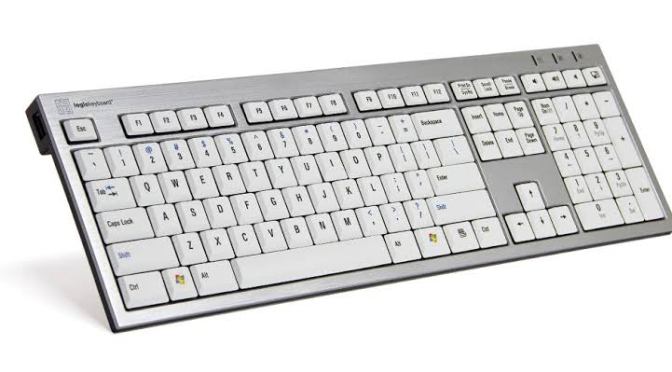
Category Archives: Education

WINDOWS SYSTEM KEY COMBINATIONS

Windows system key combinations;

F1: Help
CTRL+ESC: Open Start menu
ALT+TAB: Switch between open programs
ALT+F4: Quit program
SHIFT+DELETE: Delete item permanently
Windows Logo+L: Lock the computer (without using CTRL+ALT+DELETE)

Windows program key combinations

CTRL+C: Copy
CTRL+X: Cut
CTRL+V: Paste
CTRL+Z: Undo
CTRL+B: Bold
CTRL+U: Underline
CTRL+I: Italic

Mouse click/keyboard modifier combinations for shell objects

SHIFT+right click: Displays a shortcut menu containing alternative commands
SHIFT+double click: Runs the alternate default command (the second item on the menu)
ALT+double click: Displays properties
SHIFT+DELETE: Deletes an item immediately without placing it in the Recycle Bin

General keyboard-only commands

F1: Starts Windows Help
F10: Activates menu bar options
SHIFT+F10 Opens a shortcut menu for the selected item (this is the same as right-clicking an object
CTRL+ESC: Opens the Start menu (use the ARROW keys to select an item)
CTRL+ESC or ESC: Selects the Start button (press TAB to select the taskbar, or press SHIFT+F10 for a context menu)
CTRL+SHIFT+ESC: Opens Windows Task Manager
ALT+DOWN ARROW: Opens a drop-down list box
ALT+TAB: Switch to another running program (hold down the ALT key and then press the TAB key to view the task-switching window)
SHIFT: Press and hold down the SHIFT key while you insert a CD-ROM to bypass the automatic-run feature
ALT+SPACE: Displays the main window’s System menu (from the System menu, you can restore, move, resize, minimize, maximize, or close the window)
ALT+- (ALT+hyphen): Displays the Multiple Document Interface (MDI) child window’s System menu (from the MDI child window’s System menu, you can restore, move, resize, minimize, maximize, or close the child window)
CTRL+TAB: Switch to the next child window of a Multiple Document Interface (MDI) program
ALT+underlined letter in menu: Opens the menu
ALT+F4: Closes the current window
CTRL+F4: Closes the current Multiple Document Interface (MDI) window
ALT+F6: Switch between multiple windows in the same program (for example, when the Notepad Find dialog box is displayed, ALT+F6 switches between the Find dialog box and the main Notepad window)

Shell objects and general folder/Windows Explorer shortcuts

For a selected object:
F2: Rename object
F3: Find all files
CTRL+X: Cut
CTRL+C: Copy
CTRL+V: Paste
SHIFT+DELETE: Delete selection immediately, without moving the item to the Recycle Bin
ALT+ENTER: Open the properties for the selected object
To copy a file

Press and hold down the CTRL key while you drag the file to another folder.
To create a shortcut

Press and hold down CTRL+SHIFT while you drag a file to the desktop or a folder.
General folder/shortcut control

F4: Selects the Go To A Different Folder box and moves down the entries in the box (if the toolbar is active in Windows Explorer)
F5: Refreshes the current window.
F6: Moves among panes in Windows Explorer
CTRL+G: Opens the Go To Folder tool (in Windows 95 Windows Explorer only)
CTRL+Z: Undo the last command
CTRL+A: Select all the items in the current window
BACKSPACE: Switch to the parent folder
SHIFT+click+Close button: For folders, close the current folder plus all parent folders
Windows Explorer tree control

Numeric Keypad *: Expands everything under the current selection
Numeric Keypad +: Expands the current selection
Numeric Keypad -: Collapses the current selection.
RIGHT ARROW: Expands the current selection if it is not expanded, otherwise goes to the first child
LEFT ARROW: Collapses the current selection if it is expanded, otherwise goes to the parent
Properties control

CTRL+TAB/CTRL+SHIFT+TAB: Move through the property tabs
Accessibility shortcuts

Press SHIFT five times: Toggles StickyKeys on and off
Press down and hold the right SHIFT key for eight seconds: Toggles FilterKeys on and off
Press down and hold the NUM LOCK key for five seconds: Toggles ToggleKeys on and off
Left ALT+left SHIFT+NUM LOCK: Toggles MouseKeys on and off
Left ALT+left SHIFT+PRINT SCREEN: Toggles high contrast on and off
Microsoft Natural Keyboard keys

Windows Logo: Start menu
Windows Logo+R: Run dialog box
Windows Logo+M: Minimize all
SHIFT+Windows Logo+M: Undo minimize all
Windows Logo+F1: Help
Windows Logo+E: Windows Explorer
Windows Logo+F: Find files or folders
Windows Logo+D: Minimizes all open windows and displays the desktop
CTRL+Windows Logo+F: Find computer
CTRL+Windows Logo+TAB: Moves focus from Start, to the Quick Launch toolbar, to the system tray (use RIGHT ARROW or LEFT ARROW to move focus to items on the Quick Launch toolbar and the system tray)
Windows Logo+TAB: Cycle through taskbar buttons
Windows Logo+Break: System Properties dialog box
Application key: Displays a shortcut menu for the selected item
Microsoft Natural Keyboard with IntelliType software installed

Windows Logo+L: Log off Windows
Windows Logo+P: Starts Print Manager
Windows Logo+C: Opens Control Panel
Windows Logo+V: Starts Clipboard
Windows Logo+K: Opens Keyboard Properties dialog box
Windows Logo+I: Opens Mouse Properties dialog box
Windows Logo+A: Starts Accessibility Options (if installed)
Windows Logo+SPACEBAR: Displays the list of Microsoft IntelliType shortcut keys
Windows Logo+S: Toggles CAPS LOCK on and off
Dialog box keyboard commands

TAB: Move to the next control in the dialog box
SHIFT+TAB: Move to the previous control in the dialog box
SPACEBAR: If the current control is a button, this clicks the button. If the current control is a check box, this toggles the check box. If the current control is an option, this selects the option.

HOW TO USE YOUR PHONE AS A REMOTE CONTROL

Set up the remote control app
Download and install the Android TV Remote Control app on your phone or tablet. You can also search for “Android TV Remote Control” on Google Play.
Make sure that your phone or tablet is on the same Wi-Fi network as your Android TV.
Open the Android TV Remote Control app on your phone or tablet.
In the app, you’ll see your Android TV listed. Touch the name.
On your TV screen, you’ll see a PIN. Enter this PIN on your phone or tablet.
Then touch Pair.

20 ANDROID SECRET CODES

Android Secrete codes:

1. Phone Information, Usage and Battery – *#*#4636#*#*
2. IMEI Number – *#06#
3. Enter Service Menu On
Newer Phones – *#0*#
4. Detailed Camera
Information – *#*#34971539#*#*
5. Backup All Media Files –
*#*#273282*255*663282*#*#*
6. Wireless LAN Test – *#*#232339#*#*

7. Enable Test Mode for Service – *#*#197328640#*#*
8. Back-light Test – *#*#0842#*#*
9. Test the Touchscreen – *#*#2664#*#*
10. Vibration Test – *#*#0842#*#*
11. FTA Software Version – *#*#1111#*#*
12. Complete Software and Hardware Info – *#12580*369#
13. Diagnostic Configuration – *#9090#
14. USB Logging Control – *#872564#
15. System Dump Mode – *# 9900#

16. HSDPA/HSUPA Control Menu –*#301279#
17. View Phone Lock Status – *#7465625#
18. Reset the Data Partition to Factory State – *#*#7780#*#*
19. Format Your Device To Factory State(will delete everything on your phone) – *2767*3855#
20. Hidden Service Menu For Motorola Droid – ##7764726

Taking a Full-Screen Screenshot on Windows 8 and 10

1. Go to the screen that you want to screenshot.
Before you can take a screenshot, make sure that the screen which you want to screenshot is up with no distractions. e.g, open windows or program.

2. Find the “Print Screen” key on your keyboard.
The Print Screen key is most often found in the upper-right side of the main keyboard (not counting the number pad if your keyboard has one), and it usually has “SysReq” written below it. The Print Screen key will usually be abbreviated to “PrtSc” or something similar.

3. Press the Win key and the Print Screen key at the same time.
Doing so will take a screenshot of the current screen; in most cases, you’ll see the screen dim briefly. Your screen won’t dim if your computer has certain display settings disabled. This is most common on old computers on which you upgraded to Windows 10.And if your screenshot doesn’t appear when you look for it, try pressing Ctrl+ Win+ Print Screen or Fn+ Win+ Print Screen.

4. Find the screenshot.
You’ll find the screenshot inside of the “Screenshots” folder, which is inside of your computer’s pictures file.

THIS IS HOW TO DELETE FACEBOOK ACCOUNT

1. Go to https://www.facebook.com/help/delete_account by using your browser.If you are not automatically logged in, enter the email address or phone number and password for your account, then click Log In. It’s a blue button in the middle of the page.

2. ClickDelete My Account“. It’s below the warning message in the middle of the page.

3. Enter your password again. You’ll do so in the “Password” field at the top of the window.

4. Type in the captcha code. This code is the jumble of letters and numbers in the middle of the window; you’ll type your answer into the field below the code Then click ok

5. Finish by clicking Ok” to delete your account. It’s at the bottom of the pop-up window. Total account deletion can take more than 14 days, but your account will be gone from Facebook after that time frame.

HOW TO UNINSTALL YOUR DOWNLOADED APPS ON ANDROID PHONE

Open your device’s Settings app.

You cannot use this method to uninstall apps that came preloaded on your device. See the next section for details on removing preloaded apps

Scroll down and tap Apps. It’s in the “Device” section.

Scroll down and tap the app you want to deleted.

Tap UNINSTALL.

  • If there is no UNINSTALL button, the app is a default or system app that can’t be deleted without rooting your device. You can tap DISABLE to prevent it from functioning and hide it on your device. To permanently delete it, you’ll need to root your device and delete it from a desktop computer.
Tap OK to confirm. The app will be removed from your device

JINSI YA KUANGALIA KAMA LINE/SIMU YAKO IMEUNGANISHWA AU INACHUNGUZWA NA MTU MWINGINE

1. Nenda katika sehemu ya kupigia simu.

Hii ni sehemu ambayo wewe huadika namba na kuipiga (kwa wenye simu za batani wanaweza kuanza moja kwa moja na hatua ya pili ya bonyeza namba)

2. Bonyeza namba *#61#

Hakikisha mara mbili mbali hizi namba (*#61#) ili kuepuka kukosea na kukupelekea wewe upate majibu yasio sahihi.

3. Piga kisha subiri kwa muda.

Baada ya kuziandika vizuri kabisa hizo namba zipige na usubiri kwa muda kisha utapewa wajibu.

4. Angalia majibu.

Kama majibu yatakayokuja yatakua ni “No forwarded” basi jua simu yako haijaunganishwa na mtu yoyote nanaekuchunguza. kama majibu yatakayokuja yatakua ni “Forwarded” basi jua kuwa simu yako imeunganishwa na mtu naeweza pata taalifa zako (baadhi anajua watu wanaowailiana na wewe).

Na kama umekuta unachunguzwa piga ##21# kujiondoa.

Gusa hapa>> USOME JAMBO ZURI ZAIDI KWAAJILI YAKO

COMPUTER’S SHORTCUT KEYS SYSTEM

CTRL+A. . . . . . . . . . .. Select All
CTRL+C. . . . . . . . . . . . . . . . . Copy
CTRL+X. . . . . . . . . . . . . . . . . Cut
CTRL+V. . . . . . . . . . . . . . . . . Paste
CTRL+Z. . . . . . . . . . . . . . . Undo
CTRL+B. . . . . . . . . . . . . . . . . Bold
CTRL+U. . . . . . . . . . . . . . . . Underline
CTRL+I . . . . . . . . . . . . . . . . . Italic
F1 . . . . . . . . . . . . . . . . . . . . . . Help
F2 . . . . . . . . . . . . . . . . . . . . . Rename selected object
F3 . . . . . . . . . . . . . . . Find all files
F4 . . . . . . . . . . . . . . . . . . . . . Opens file list drop-down in dialogs
F5 . . . . . . . . . . . . . . . . . . . . . Refresh current window
F6 . . . . . . . . . . . . . . . . . . . . . Shifts focus in Windows Explorer
F10 . . . . . . . . . . . . . . . . . . . . Activates menu bar options
ALT+TAB . . . . . . . . . . . . . . . . Cycles between open applications
ALT+F4 . . . . . . . . . . . . . . . . . Quit program, close current window
ALT+F6 . . . . . . . . . . . . . . . . . Switch between current program windows

ALT+ENTER. . . . . . . . . . . . . . Opens properties dialog
ALT+SPACE . . . . . . . . . . . . . . System menu for current window
ALT+¢ . . . . . . . . . . . . . . . . . . opens drop-down lists in dialog boxes
BACKSPACE . . . . . . . . . . . . . Switch to parent folder
CTRL+ESC . . . . . . . . . . . . . . Opens Start menu
CTRL+ALT+DEL . . . . . . . . . . Opens task manager, reboots the computer
CTRL+TAB . . . . . . . . . . . . . . Move through property tabs
CTRL+SHIFT+DRAG . . . . . . . Create shortcut (also right-click, drag)
CTRL+DRAG . . . . . . . . . . . . . Copy File
ESC . . . . . . . . . . . . . . . . . . . Cancel last function
SHIFT . . . . . . . . . . . . . . . . . . Press/hold SHIFT, insert CD-ROM to bypass auto-play
SHIFT+DRAG . . . . . . . . . . . . Move file
SHIFT+F10. . . . . . . . . . . . . . . Opens context menu (same as right-click)
SHIFT+DELETE . . . . . . . . . . . Full wipe delete (bypasses Recycle Bin)
ALT+underlined letter . . . . Opens the corresponding menu
PC Keyboard Shortcuts
Document Cursor Controls
HOME . . . . . . . . . . . . . . to beginning of line or far left of field or screen
END . . . . . . . . . . . . . . . . to end of line, or far right of field or screen
CTRL+HOME . . . . . . . . to the top
CTRL+END . . . . . . . . . . to the bottom
PAGE UP . . . . . . . . . . . . moves document or dialog box up one page
PAGE DOWN . . . . . . . . moves document or dialog down one page
ARROW KEYS . . . . . . . move focus in documents, dialogs, etc.
CTRL+ > . . . . . . . . . . . . next word
CTRL+SHIFT+ > . . . . . . selects word
Windows Explorer Tree Control
Numeric Keypad * . . . Expand all under current selection
Numeric Keypad + . . . Expands current selection
Numeric Keypad – . . . Collapses current selection
¦ . . . . . . . . . . . . . . . . . . Expand current selection or go to first child
‰ . . . . . . . . . . . . . . . . . . Collapse current selection or go to parent.

SMS MZURI ZA MAHABA KWAAJILI YA MPENZI WAKO

Mahaba unayonipa natamani niwe nawe mpaka
kufa,
kila siku zinavyozidi kupita
najuta kwanini nilichelewa penzi kukupa,
nakupenda na nitakupenda hadi kufa!
•·.·°¯`·.·•*•·.·°¯`·.·•

Hivi ni lini penzi utanipa, nimechoka na ahadi
unazonipa kila kunapokucha,
tambua kwako nimefika na siku utakayonipa
zawadi nzuri nitakupa na hutanisahau
hadi kufa.
•·.·°¯`·.·•*•·.·°¯`·.·

GUSA HAPA>>> SOMA SIMULIZI YA UTAMU YA KIKUBWA YA MAPENZI (SUKARI YA DADA)

Nisamehe la azizi ukweli mbona uko wazi,
yule si wangu mpenzi ila ni rafiki yangu
kipenzi, yangu mapenzi ni wewe pekee nayekupa mpenzi,
katika hii dunia ni wewe
pekee penzi nayekupatia!
•·.·°¯`·.·•*•·.·°¯`·.·•

Uko wapi wangu malkia, mwenzio hamu nasikia nawe
ndiye ujuwaye hamu kunitoa,
tafadhali dear upatapo msg hii tambua nyumbani
nakusubiria! Luv u
•·.·°¯`·.·•*•·.·°¯`·.·•
Hakika raha wajua kunipatia, fimbo wajua kuitumia sharti
mtoto wakike nabaki
nagugumia kwa raha unayonipatia ambayo wengi
wanaililia , plz utamu wangu
nitunzie!
•·.·°¯`·.·•*•·.·°¯`·.·•
Nashukuru kwa miguno uliyonipatia na kiuno kunikatia,
utamu niliousikia
nilitamani kulia hatima ilipowadia , nakupenda
dia usije utamu wangu mwingine
kumpatia! Luv u
•·.·°¯`·.·•*•·.·°¯`·.·•

GUSA HAPA>>> SOMA SIMULIZI YA UTAMU YA KIKUBWA YA MAPENZI (SUKARI YA DADA)
Wikiendi ndiyo imeisha, majukumu hatunabudi kuyatimiza dear,
kuwa nawe muda mrefu
nimefurahia nakujihisi malkia katika hii dunia kuwa
nawe najivunia. Luv u
•·.·°¯`·.·•*•·.·°¯`·.·•
Wangu Malkia nashukuru kwa mahaba uliyonipatia,
nikikumbuka miguno na viuno ulivyonipatia na
raha niliyojisikia, nahisi kuna mwingine unampatia,
please dear penzi langu usije wengine kuwapatia! Nakupenda.
•·.·°¯`·.·•*•·.·°¯`·.·•

GUSA HAPA>>> SOMA SIMULIZI YA UTAMU YA KIKUBWA YA MAPENZI (SUKARI YA DADA)

Nashukuru kwa ya

ko dozi hakika katika
mapenzi wewe ni mkufunzi,
wajua bakora kuitumia, mpenzi usije ukawa na
mwingine
unayempatia, hakika nikijua nitaumia kama
sikujiuam. Nnakupenda!
•·.·°¯`·.·•*•·.·°¯`·.·•
Nimeamini wewew ni mtalam wajua kunitoa hamu,
unipapasapo huhisi kupoteza fahamu, maneno yako
matamu hunizidisha hamu, hakika
wajua kunikamua, luv u.
•·.·°¯`·.·•*•·.·°¯`·.·•
Hakika nimepata tabibu, maradhi yangu wajua
kujyatibu,
napenda jinsi unavyonitibu,
huna papara yaani ni taratibu,
mpenzi usijemuonyesha mwingine hizo
zako zabibu,
maswahibu yakatayonisibu hakuna
atakayeweza kuyatibu, nakupenda.
•·.·°¯`·.·•*•·.·°¯`·.·•
Usiku wa jana ulikuwa wa aina yake, ulinipa mambo
matamu yasiyo ya kawaida,
ulinifurahisha sana mpenzi wangu,
ulidhihirisha kuwa wewe ni kidume
uliyeubwa kwa ajili yangu..
•·.·°¯`·.·•*•·.·°¯`·.·•
Nakumbuka siku utamu ulityonipa maneno
matamu kedekede hukusita kunipa na
ahadi kibao masikioni mwangu zilisikika,
hakika roho yangu haikusita kuamini
kwako nimefika, nashangaa
leo utamu hutaki nipa!
•·.·°¯`·.·•*•·.·°¯`·.·•
Wikiend ndiyo siku niliyokuwa nikiisubiria mimi
nawe mpenzi tupate tulia, mahaba na
maneno matamu ndio zawadi
niliyokuandalia. Kumbuka yetu
miadi na jali wakati!
•·.·°¯`·.·•*•·.·°¯`·.·•
.
unayempatia, hakika nikijua nitaumia
kama sikujiuam. Nnakupenda!
•·.·°¯`·.·•*•·.·°¯`·.·•
Nimeamini wewew ni mtalam wajua kunitoa hamu,
unipapasapo huhisi kupoteza fahamu,
maneno yako matamu hunizidisha
hamu, hakika wajua kunikamua,
luv u.
•·.·°¯`·.·•*•·.·°¯`·.·•
Kuwa nawe najivunia, mtoto mapenzi wayajua,
kiuno, sauti yako tamu mithili ya
chiriki wajua hasa kuitumia, mua wangu
wajua kuukamua, ukiniacha jua nitaumia,
nakupenda usije niacha nitajiua!
•·.·°¯`·.·•*•·.·°¯`·.·•
usiku unapoingia najawa na furaha unajua kwanini?
unaponigusa nahisi tumeumbwa wawili,
mchana nakumisi sana unapokuwa kazini,
wikiendi natamani isiishe kwani unanipa
raha ambazo siwezi kuzipata popote. . .
Naomba raha hizi usimpe mwingine. . .
•·.·°¯`·.·•*•·.·°¯`·.·•
kila ninapoona macho yako nafurahia uwepo
wako,nikiona tabasamu lako,nasikia homa ya
moyo,nikiona chozi lako la furaha
,moyo wangu unakuwa
huru kwako,nakupenda sana mpenzi
wangu na
wewe ndiye valentine wangu. . .
Pokea busu mwaaaah
•·.·°¯`·.·•*•·.·°¯`·.·•
pumzi yako kwangu ni burudani ya ajabu,
nakupenda sana busu lako maridhawa
shavuni mwangu.wewe ndiye furaha
katika maisha yangu.labda ulikuwa
hufahamu,nimekuficha moyoni
mwangu mpenzi!
•·.·°¯`·.·•*•·.·°¯`·.·•
darling jana umenikuna. . . .umenikuna c kdogo
. . . .nililia ukanibembela,niliponyamaza
ukaniliza tena,lkn fahamu kulia
kwangu c maumivu bali utamu wako.
•·.·°¯`·.·•*•·.·°¯`·.·•
Nashukuru wangu laaziz kwa uwepo wako,
naamin meng kunitimizia na kukata kiu la
penzi langu kwa wako uhodari.
Krbu mpz nikate kiu yangu.
•·.·°¯`·.·•*•·.·°¯`·.·•
hakiyanani mpz unanidatisha ukitembea unatingisha,
mwenzio unanipagawisha
kwako nimefika
na hii namaanisha
nakupenda
•·.·°¯`·.·•*•·.·°¯`·.·•
Mahaba unayonipa hakika nafarijika,
mpenzi niliyemtaka hakika nimekupata,
kiu yangu wajua kuikata, kuwa
nawe hakika
nimeukata kwani wajua kunipa
bata! Luv u, mwaah
•·.·°¯`·.·•*•·.·°¯`·.·•

Gusa hapa>> USOME JAMBO ZURI ZAIDI KWAAJILI YAKO